


APPatient
4.04.41K Reviews
App Specs
- Version
- 7.14.0 (7ed9040)
- Updated On
- License
- Free
- Downloads
- 1,000,000+
- Developer
- ModMed
- Categories
- Medical
- Platform
- Android, iOS
Screenshots
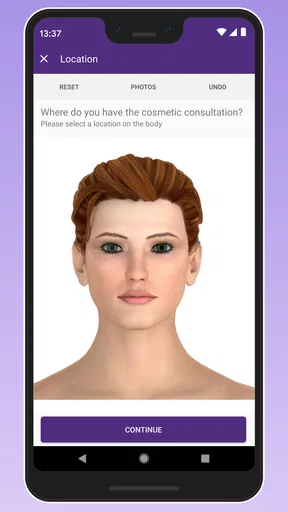
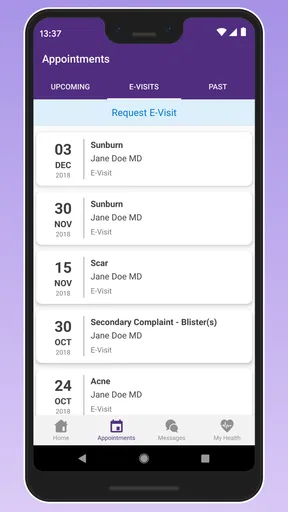
 Analysis by AppCompare
Medical apps are most useful when they remove small obstacles at exactly the moment you need care. That is the role I found with APPatient: it gives patients a mobile place to handle parts of an existing healthcare relationship instead of making every task depend on a phone call or a desktop browser. I used it as a companion to a provider’s office, not as a diagnostic tool, and that distinction matters from the first tap.
The app is free, belongs to the medical category, and is developed by ModMed. Its store presence shows a 4.0 average from around 11 thousand ratings, with more than a million installs. Those figures suggest that it is not a niche experiment, but they also set a realistic expectation: this is a practical patient portal, not a polished wellness platform designed to replace professional care.
From needing an answer to finishing the task
I find the most useful way to judge a patient portal is to follow one ordinary task from start to finish: what I need, how quickly I can reach it, and what happens if the first route stalls. That makes it easier to distinguish a genuinely convenient shortcut from another app that only moves paperwork onto a phone. The next section looks at how APPatient fits into that everyday sequence.
The starting point: an appointment or a loose end
The most convincing use case begins with something ordinary. I might have an upcoming appointment, need to check a medical record, want to send a question to my provider, or simply want to confirm what is scheduled. In the usual alternative, I would search for the office number, wait through a phone menu, explain my identity, and hope the right person calls back. APPatient moves much of that first step into one patient-facing app.
That does not mean it creates a new care relationship by itself. The useful experience depends on the medical practice using the ModMed system and making the relevant patient functions available. Once that connection exists, the app makes sense as a front door to information already associated with the provider’s office. Without that relationship, it is not especially useful as a general-purpose medical reference.
I also appreciate that the app’s purpose is narrow. It is not trying to turn symptoms into a diagnosis, offer a social feed, or encourage me to track every part of my lifestyle. For someone who wants a direct route to appointments, records, and provider communication, that focus is a strength. For someone looking for medication reminders, fitness tracking, or broad health education, it is the wrong category of tool.
Finding the right information without a call
After opening the app, the practical workflow is about locating the task rather than browsing for entertainment. Upcoming appointments are the obvious starting point. I can check what is on the calendar before leaving home, which is more useful than relying on an old confirmation message or trying to remember whether an appointment was moved.
Worth Reading Before You Choose

Flipboard Shows What News Apps Must Do Beyond the Feed

Switching to Android Auto Means Rethinking Your Driving Routine

Google Calendar Makes a Crowded Week Easier to Manage

Ludo King Makes the Most of the Minutes Between Plans

Baby Panda World Brings Quick Play to Modern Phones, but Its Game Library Feels Busy

ESPN’s Live Game View Makes Following Close Games Easier
The same screen-oriented approach helps with medical records. Instead of treating the app as a place to write a personal health diary, I see it as a window into information maintained by the provider. That difference is important when deciding whether it should become my main health archive. I would still keep personal notes, medication details, and documents in a system I control, because a provider portal is designed around the care organization’s workflow.
A less obvious benefit is the reduction of context switching. When I am already thinking about a visit, I can check the appointment and move toward a message or record review in the same environment. That is more efficient than combining a calendar app, email, paper instructions, and a separate phone conversation. The gain is not dramatic after one use, but it becomes noticeable when several small administrative questions arrive around the same visit.
Messaging a provider with better timing
Provider messaging is where the app can save the most effort, provided the question is appropriate for that channel. I would use it for a non-urgent clarification connected to ongoing care, such as asking about an instruction I received or checking what I should bring to a scheduled visit. Writing the question gives me time to make it precise, and the conversation remains tied to the medical office rather than disappearing into personal email.
There is a useful discipline hidden in this workflow: I can separate the question from the urgency. A message is suitable for something that can wait for the office’s normal process. It is not a replacement for emergency help, immediate clinical assessment, or a live conversation when symptoms are changing quickly. The app makes communication easier, but it does not change the seriousness of the situation.
I would also write messages as if a busy staff member will read them between other tasks. A short explanation, the relevant appointment context, and one clear question are more practical than a long account covering unrelated symptoms. This is not a feature advertised by the interface; it is a workflow lesson that makes the communication function more useful and reduces avoidable back-and-forth.
The handoff from patient to practice
The app’s most important handoff happens after I submit information. The message leaves my device and enters the provider’s operational process. That means the quality of the outcome depends partly on who receives it, how the practice manages patient communication, and whether the issue belongs in messaging at all. APPatient can make the handoff cleaner, but it cannot guarantee a particular response time or resolve an office’s staffing limitations.
This is also why I would not treat the app as an always-on line to a clinician. A patient portal can feel immediate because the message is sent from a phone, yet the receiving side may still need to review records, consult a clinician, or route the question to another person. The best experience comes from understanding that the app improves access to the office workflow; it does not erase that workflow.
For families or people helping another adult manage care, this handoff deserves extra attention. The person holding the phone may not be the person receiving treatment, and medical communication can involve identity, consent, and privacy considerations. I would confirm how the practice wants that arrangement handled rather than assuming that convenient access automatically gives someone permission to speak for another patient.
What the completed workflow feels like
When everything lines up, the result is simple: I know when the appointment is, I can review the information the practice makes available, and I have a direct place to send a suitable question. That is not flashy, but it is meaningful. Administrative uncertainty often creates more stress than the medical task itself, especially before a visit or after receiving instructions that I want to verify.
The app is particularly helpful for people who dislike phone calls, work irregular hours, or need to check details while away from a computer. It also suits patients who already receive care from a ModMed-connected practice and want one repeatable routine. Open the app, check the next appointment, review the relevant record, and message the office only if something remains unclear. That sequence is easier to remember than a collection of separate habits.
Another practical outcome is better preparation. Before an appointment, I can identify what I still need to ask instead of discovering the question after leaving the office. I would make a short list while reviewing the available information, then use the visit for issues that need discussion and the messaging function for suitable follow-up. That turns the app from a passive record viewer into a small planning aid.
Where the flow breaks
The first weak point is dependence on the provider. If the practice does not use the relevant ModMed patient workflow, the app cannot offer the same value I would get from an active connection. This makes it different from a general notes app or a standalone appointment calendar, which I can use regardless of who my doctor is. Before committing to it, I would check whether my practice supports APPatient and which patient tasks it actually enables.
The second limitation is scope. I would not install it expecting a complete personal health-management system. Its center of gravity is the provider relationship: appointments, records, and communication. Someone who wants one place for data from several unrelated clinics may prefer a broader health platform, while someone who mainly needs reminders may find a simple calendar or medication app faster.
There can also be friction when a task crosses channels. A message may be the right starting point but not the right ending point if the provider needs more detail, a phone conversation, or an in-person examination. Similarly, viewing a record is not the same as understanding every clinical term in it. I would use the app to identify what needs clarification, not to make confident medical decisions from isolated information.
The age classification is Mature 17+, which is worth noting for households deciding which device or account should be used. The app is designed around personal medical information, so I would be deliberate about device access, screen visibility, and account handling. Those habits matter more here than the convenience of having another icon on the home screen.
How it compares with the usual alternatives
Compared with calling the practice, APPatient is better for checking information without waiting on hold and for composing a question carefully. A phone call remains better when the issue is urgent, complicated, or likely to require immediate clarification. I would not choose one method permanently; I would use the app for routine, non-urgent administration and the phone for situations where conversation is the safer or faster route.
Compared with email, the app is more naturally tied to the provider’s patient workflow. Email may feel familiar, but it can scatter medical conversations among unrelated messages and make it harder to keep the context of an appointment visible. The app’s advantage is not that every message will be answered instantly; it is that the communication begins in a place intended for this kind of exchange.
Compared with a paper calendar, the appointment area is easier to consult when plans change or when I am away from home. Paper still has one advantage: it gives me a personal backup that does not depend on opening an app or remembering an account. I would keep important dates in my own calendar as well, especially if missing the appointment would create a serious inconvenience.
Compared with a general health app, APPatient is more focused and less useful for unrelated tracking. That narrowness is exactly why I would recommend it to an established patient of a supported practice, but not to someone shopping for a broad digital health dashboard. The right choice depends less on the app’s feature count than on where the person’s care is actually organized.
Version, access, and everyday expectations
The current version is 7.14.0, identified as 7ed9040, and it runs on Android 7.0 or later. That gives it a relatively broad reach for people using older Android devices, although I would still keep the operating system and app updated when possible. Medical software is not the place where I would knowingly rely on an outdated installation if an update is available.
APPatient is free to install, so the main decision is not a subscription calculation. The more important question is whether it fits the practice I use and the way I prefer to manage care. A free app that does not connect to my provider is less valuable than a paid service I actually need, while a supported patient portal can justify keeping it even if I open it only around appointments.
The app was released on March 2, 2016, and its continued presence alongside the current release suggests a long-running product rather than a temporary experiment. I would not treat longevity as proof that every interaction will feel modern, though. In my experience with medical portals generally, usefulness depends on clarity and reliability more than visual novelty, and those are the qualities I would watch most closely here.
Who should use it, and who should skip it
I would recommend APPatient to a patient whose provider uses ModMed, who wants quick access to upcoming appointments, and who prefers written communication for routine questions. It is also a sensible choice for people who regularly lose paper instructions or find phone-based scheduling frustrating. The strongest benefit comes from repeated, small interactions rather than one dramatic medical event.
I would be more cautious for someone managing care across many unrelated organizations. The app may still help with one supported practice, but it should not be mistaken for a universal record hub. I would also steer people with urgent symptoms toward appropriate immediate care instead of encouraging them to wait for a portal reply. The app supports care administration; it does not determine the correct level of medical attention.
My final view is positive but measured. APPatient is most valuable when it shortens the distance between a patient’s question and the right provider workflow. It does not replace a clinician, a phone call, a personal calendar, or emergency services, and it works best when the practice connection is active. For the right patient, however, that focused role is enough to make appointments, records, and routine messages less scattered and easier to manage.
Pros
- Simple interface makes patient information easy to find.
- Useful for reviewing appointments and personal health details.
- Can reduce reliance on paper records and phone calls.
- Convenient access to healthcare information while traveling.
- May help patients stay more organized between visits.
Cons
- Availability of features may depend on the healthcare provider.
- Some users may find account setup and verification time-consuming.
- Requires a stable internet connection for many functions.
- Health information access can be limited during system maintenance.
- Older devices may not provide the smoothest app experience.
FAQs for APPatient
What is APPatient, and who is it designed for?
APPatient is a mobile application intended for patients of participating healthcare providers. It can help users manage appointments, communicate with a medical office, complete forms, review certain health information, and receive practice-related notifications. Available features may differ depending on the healthcare organization using the platform, so the app is most useful when your provider has specifically invited you to use it.
How do I create an APPatient account or sign in?
To use APPatient, you generally need to register with information connected to your healthcare provider’s records, such as an email address, phone number, or patient invitation. Some practices may provide an activation link or enrollment instructions. If registration fails, your details are not recognized, or you cannot access your account, contact the provider’s office directly because they may need to verify or update your patient information.
Can I schedule appointments and communicate with my healthcare provider through APPatient?
Depending on the participating practice and the services it has enabled, APPatient may allow you to request or manage appointments, send secure messages, and receive updates from the office. It should not be treated as an emergency communication tool. For urgent symptoms, call local emergency services or seek immediate medical attention rather than waiting for a response inside the application.
Does APPatient provide access to medical records, prescriptions, or test results?
APPatient may display selected health information, such as appointment details, forms, treatment-related messages, prescriptions, or test results, but access depends entirely on the connected healthcare provider and its configuration. The app may not contain your complete medical history. Always confirm important information with your doctor or practice, especially when making decisions about medication or treatment.
Is APPatient free, and how should I protect my personal health information?
The app may be available to download without a separate charge, although normal mobile data or internet costs can apply. Because APPatient may handle sensitive personal and health information, use a strong, unique password and enable your device’s screen lock or biometric protection. Avoid signing in on shared devices, keep the app updated, and review the provider’s privacy practices before using its features.


